

ADR : Document Architecture Decisions Effectively
How to Capture, Track, and Learn from Your System Architecture Choices

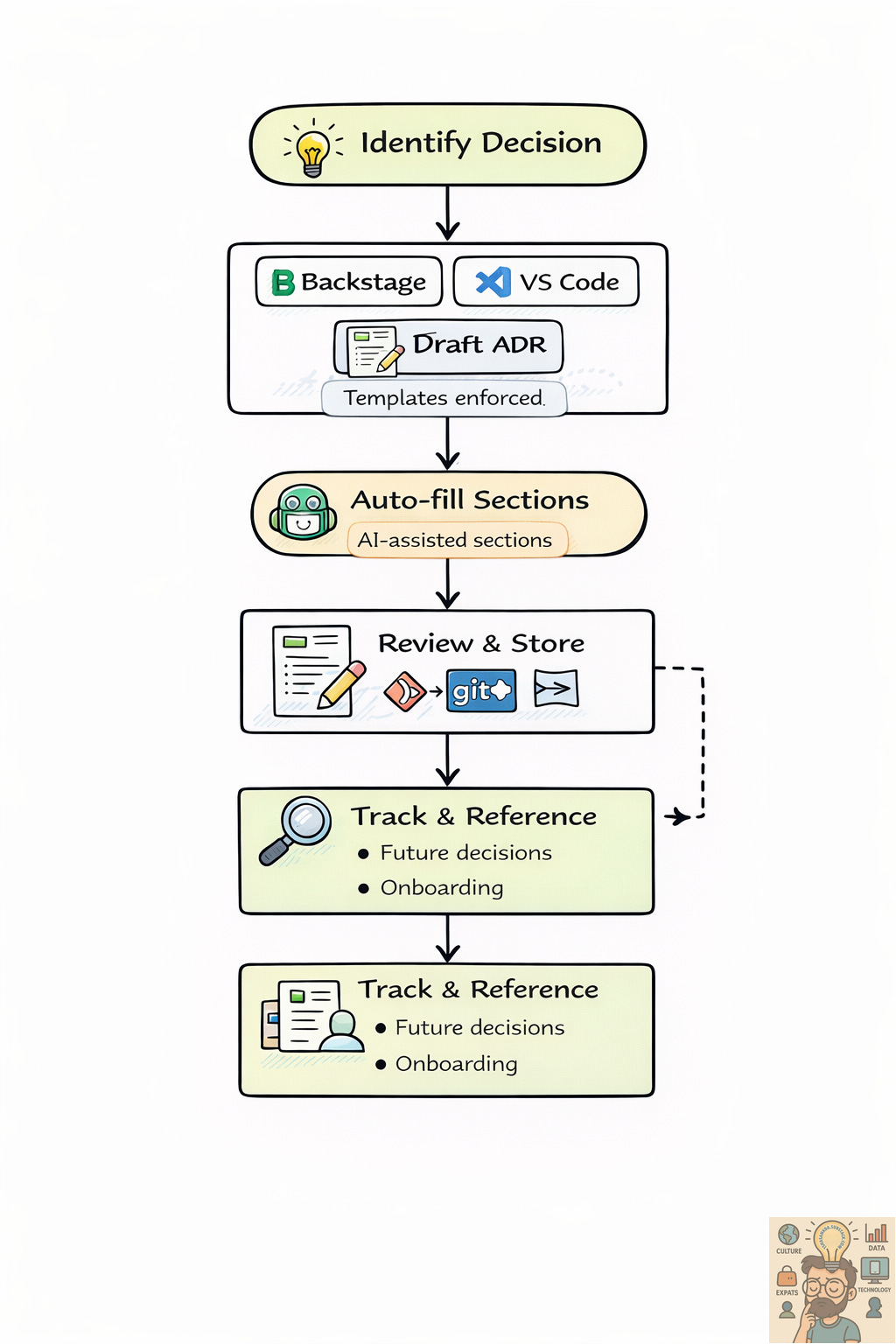
Architecture Decision Records (ADRs) are concise documents that capture the important architectural decisions made for a system, why they were made, and the consequences. They provide a transparent history of the architecture and help teams understand past choices, make better decisions in the future, and onboard new members faster.
Without ADRs, teams often repeat debates, lose institutional knowledge, or struggle to understand why a system is designed a certain way. ADRs solve this by making decisions explicit, traceable, and easily accessible.
Why ADRs Matter
ADRs are not just bureaucratic overhead; they are a critical tool for sustainable architecture. They help teams align on choices, track the evolution of systems, and support continuous improvement. For new team members, ADRs serve as a practical learning resource that explains the “why” behind decisions rather than just the “what.”
Consistently maintaining ADRs ensures that architectural knowledge is not lost over time, helps prevent repeated mistakes, and enables confident decision-making in complex systems. For more details, see TechTarget ADR Best Practices.
Want to dive deeper into ADR? This is one of the go-to resources.
Good Practices for Creating ADRs
Creating ADRs effectively requires discipline and consistency. Here are some best practices to follow:
Use a consistent format and template. Ensure all ADRs follow the same structure so that team members can quickly understand each record.
Keep ADRs concise. Focus on the key decision points and avoid unnecessary detail that does not aid understanding.
Document decisions promptly. Capture the decision as soon as possible after it is made to preserve context and reasoning.
Store ADRs in an accessible repository. Use tools like GitLab or Confluence so all stakeholders can view and reference them easily.
Encourage collaboration. Gather feedback from all relevant stakeholders to ensure decisions are well-informed.
Track architectural evolution. Use ADRs to maintain a clear history of decisions, showing how architecture has evolved over time.
Use ADRs for continuous improvement. Review past decisions to learn lessons and refine architecture practices.
Leverage ADRs for onboarding. New team members can quickly understand the system and its design rationale.
Review and update ADRs regularly. Ensure they remain relevant as the system and context evolve.
Key Considerations
ADRs should be maintained for all products and systems, even if the team decides the storage location or process.
ADRs must be searchable, auditable, and uniquely referencable.
While teams may choose the tools that fit their workflow, Git repositories or Confluence are commonly used for ADR storage.
Retention and governance must meet the minimum organizational standards to ensure compliance and long-term usefulness.
Recommended ADR Template
Each ADR should follow a consistent structure, with short, clear titles and logical sections. Titles should use present-tense imperative phrasing, similar to a Git commit message, and less than 50 characters.
Template Structure
Title: Short, action-oriented description of the decision
Example:
Use GraphQL for internal APIs
1. Status
Current state of the decision: Proposed, Accepted, Deprecated, Superseded.
2. Context
Describe the problem, issue, or motivation for this decision. Explain why a decision is necessary and what triggered it.
Example: “The current REST APIs are causing repeated versioning conflicts and increased overhead in frontend-backend coordination.”
3. Considered Options
List all the options that were considered to solve the problem.
Example: “1) Continue using REST 2) Switch to GraphQL”
4. Pros and Cons
Provide advantages and disadvantages for each option.
Example:
REST: Well-known, widely supported; difficult to manage multiple versions
GraphQL: Flexible, single endpoint, reduces over-fetching; requires learning and standardization
5. Decision
State the chosen option clearly, describing the change or action being implemented.
Example: “Adopt GraphQL for all new internal APIs.”
6. Consequences
Explain what becomes easier or harder due to this decision. Include both intended benefits and potential drawbacks.
Example:
Frontend developers can fetch exactly the data they need
Backend teams require training on GraphQL patterns
Monitoring and caching patterns must be updated
Storage Recommendations
Store ADRs in a central, version-controlled repository for accessibility and traceability.
Use Git repositories for code-aligned projects or Confluence for documentation-focused projects.
ADRs should be searchable and linked to the relevant project or system.
Ensure ADRs are reviewed and updated periodically.
ADR Tools with Features
A variety of ADR tools exist to help teams create, manage, and visualize architecture decisions. For a full list, see TechTarget ADR Tools.
From personal experience, two tools stand out for practical day-to-day use:
Backstage ADR Plugin
Description: Integrates ADR management directly into the Backstage developer portal.
Features: Visual ADR overview, linking decisions to components and services, easy access for developers.
Use case: Ideal for teams already using Backstage as their internal developer portal, providing a centralized place for architectural decisions.
Visual Studio Code Extensions
Description: In-editor extensions for creating ADRs directly in VS Code.
Features: Predefined templates, scaffolding, and linking ADRs to related files or projects.
Use case: Developers can write ADRs alongside code, enforcing template consistency and saving time.
For other ADR tools such as ADR Manager, dotnet-adr, Log4brains, or PyADR, see TechTarget ADR Tools
Closing Thoughts
ADRs help teams capture decisions early, track the evolution of systems, and onboard new members efficiently. When used consistently, ADRs form the backbone of maintainable and transparent architecture practices.
By combining ADRs with documentation as code, teams can create architecture documentation that is always up to date, accessible, and useful, setting the foundation for confident decision-making and scalable system design.
ADR Markdown Template (Ready to Use)
You can copy and adapt this template for any decision:
# [Short, Imperative Title]
**Status:** Proposed / Accepted / Deprecated / Superseded

## Context
Describe the issue, motivation, or problem that triggered this decision.

## Considered Options
1. Option A
2. Option B
3. Option C

## Pros and Cons
**Option A:**
- Pros: ...
- Cons: ...

**Option B:**
- Pros: ...
- Cons: ...

## Decision
State the chosen option and the action being implemented.

## Consequences
Explain benefits, challenges, and trade-offs resulting from this decision.
Next blog posts in the series will cover:
Series 3: Documentation as Code – How to integrate ADRs and diagrams in Git/Markdown workflows.
Series 4: AI-assisted System Documentation – Using AI to generate, update, and review architecture documentation automatically.