

A Practical Guide to Architecture Documentation
Where to Start, What to Document, and How to Build Maintainable Architecture Knowledge

In many teams and organizations, architecture documentation is either missing, outdated, or created only for compliance. Most engineers and architects have questions around documentation — what to document, which tools to use, where to find templates, and how to even start learning system architecture properly. But for various reasons, these questions are rarely raised openly.
Over time, I’ve received consistent feedback from mentees, peers, and team members:
Where are our architecture documents?
What tools should we use to create diagrams?
Do we have any templates or standards?
How do we start learning system architecture properly?
So in today’s post, I want to focus specifically on architecture documentation — why it matters, how to approach it, and what views you should ideally cover.
This blog series is mainly focused on standardizing architecture documentation and sharing best practices to create documentation that is easy to maintain and keep up to date.
My goal is also to help junior engineers develop interest in architecture concepts early in their careers — not just coding, but understanding systems as a whole.
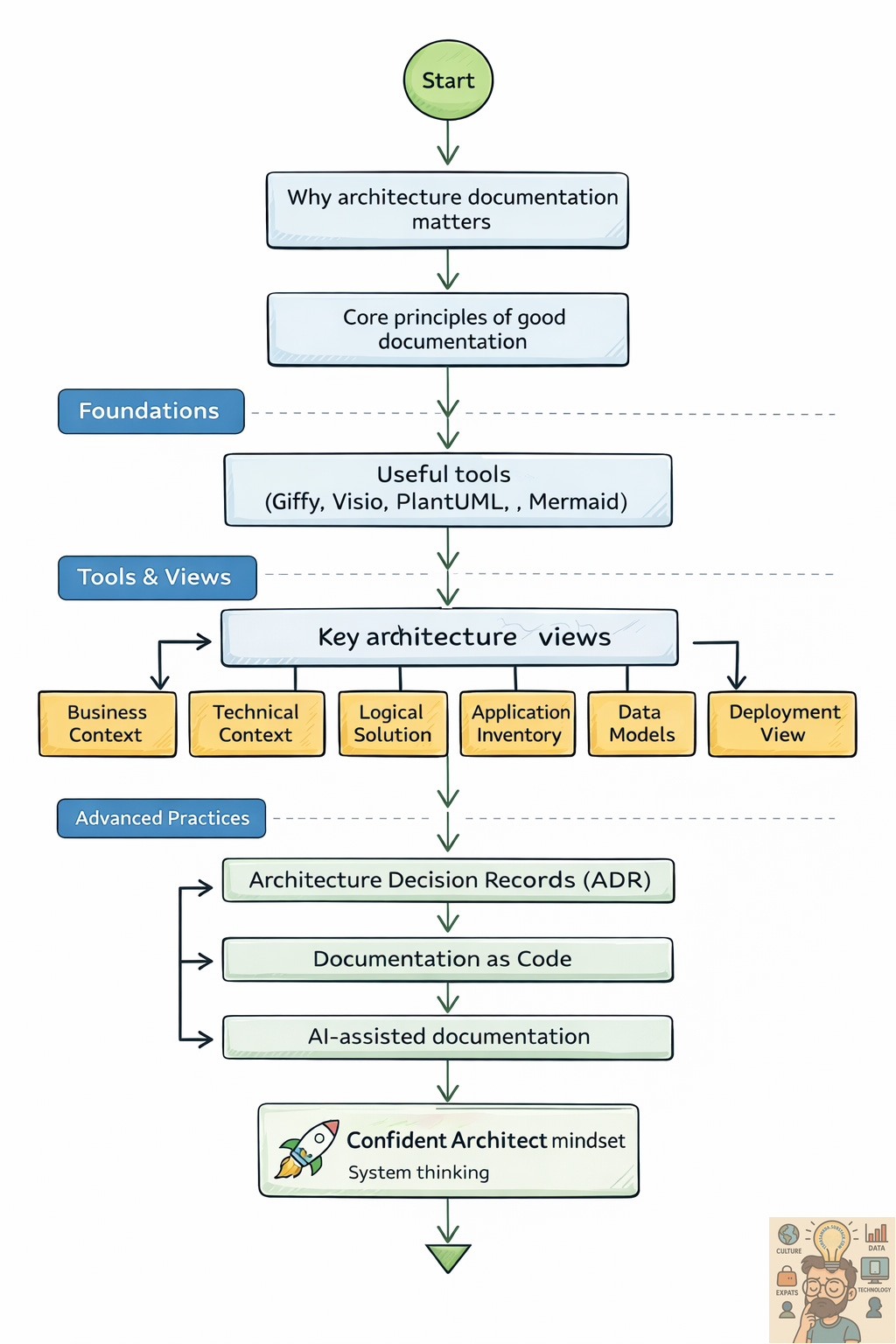
Core Principles of Good Architecture Documentation
Before jumping into tools and diagrams, a few fundamentals matter more than anything else.
1. Identify your primary audience
Your audience could be:
Business stakeholders
Developers
Operations teams
Security and compliance
Leadership
Each group needs different levels of detail. One document cannot serve everyone perfectly.
2. Create only what your audience needs
A common mistake is documenting everything. More documentation does not mean better documentation.
Focus on:
What decisions people need to make
What information helps them do their job
3. Keep documentation up to date
Outdated architecture is dangerous. It leads to wrong assumptions, broken integrations, and poor decisions.
If you cannot maintain a diagram — don’t create it.
4. Make documentation easy to find and accessible
Store documentation in places people already use:
Confluence / Notion
Git repositories
SharePoint / Wiki
Hidden documentation is as good as no documentation.
Tools for Creating Architecture Diagrams
Architecture documentation is primarily represented using diagrams. There is a wide range of tools available today from simple collaboration tools to specialized enterprise modelling software. The key is choosing the right tool based on purpose, collaboration, and accessibility.
1. Giffy – great for brainstorming and early design
In my view, Giffy works best during the brainstorming and design phase.
It allows better collaboration with development teams and makes it easy to sketch ideas quickly during discussions and workshops.
Best for: early design, workshops, team collaboration.
2. Microsoft Visio – the classic enterprise standard
Most people are already familiar with Visio as it has been a standard Microsoft diagramming tool for years.
It is especially useful when:
Embedding diagrams into MS Word and PowerPoint
Working in organisations with Office 365 (often part of the license)
Best for: formal documentation in enterprise environments.
3. PlantUML – diagrams as code
PlantUML is an open-source tool that allows users to create diagrams using a plain text language.
It is a great choice when:
Storing diagrams in Git repositories
Working with Markdown documentation
Creating sequence diagrams and system flows as code
Best for: DevOps-friendly documentation.
4. Mermaid – lightweight open source alternative
Mermaid is another open-source tool similar to PlantUML.
It works very well inside:
Markdown files
GitHub/GitLab documentation
Best for: quick technical documentation.
5. Sparx Enterprise Architect – full enterprise modelling tool
Sparx EA is a comprehensive enterprise architecture and UML modelling platform.
It is commonly used for:
Detailed UML analysis
Formal architecture governance
Large organisations
6. Visual & Collaborative Tools
Draw.io (diagrams.net) – free, simple, widely used
Lucidchart – cloud-based, very popular
Miro – excellent for workshops and brainstorming
Figma / FigJam – increasingly used for system flows
7. Enterprise Modelling Tools
Archi (ArchiMate)
BizzDesign
Architecture Documentation Categories
(With Diagram References & Mandatory Key Elements)
1. Business Context View
Reference: C4 Model – System Context Diagram
Key Elements
Business goals
Stakeholders
User personas
External partners
High-level business processes
Why it matters
Aligns technology with business value.
2. Technical Context View
Reference: C4 System Context Diagram
Key Elements
External systems
APIs and integrations
Data flow directions
Communication protocols
Ownership of systems
Why it matters
Avoids dependency surprises.
3. Logical Solution Overview
Reference: C4 Container Diagram
Key Elements
Major services/components
Responsibilities
Communication paths
Technology type (API, DB, queue, UI)
Why it matters
Foundation of the system design.
4. Interface Overview
Reference: UML Component Diagrams
Key Elements
APIs
Message brokers
Protocols
Data formats
Versioning
Why it matters
Smooth integrations.
5. Application / Service Inventory
Reference: Application Portfolio Views
Key Elements
Service name
Owner
Technology stack
Criticality
Lifecycle status
Why it matters
Governance and modernization.
6. Data Flow View
Reference: Data Flow Diagrams (DFD)
Key Elements
Data sources
Processing steps
Storage
Consumers
Frequency
Why it matters
Analytics and compliance.
7. Conceptual Data Model
Reference: High-level ER Diagrams , Conceptual data model
Key Elements
Business entities
Relationships
Definitions
Why it matters
Common understanding.
8. Logical Data Model
Reference: Logical data model
Key Elements
Attributes
Keys
Relationships
Constraints
Why it matters
Schema design.
9. Physical Data Model
Reference: Database Schema Diagrams
Key Elements
Tables
Indexes
Partitions
Storage design
Why it matters
Performance.
10. Security View
Reference: Threat Modeling
Key Elements
Authentication
Authorization
Encryption
Trust boundaries
Network zones
Why it matters
Risk control.
11. Deployment View
Reference: Infrastructure Architecture Diagrams
Key Elements
Cloud services/servers
Environments
Scaling
Load balancers
Monitoring
Why it matters
Reliability.
12. Sequence Diagrams
Reference: UML Sequence Diagrams
Key Elements
Actors
Components
Message flow
Error paths
Why it matters
Clear behaviour flow.
13. Cloud Account / Subscription Model
Reference: Cloud Landing Zone Architecture
Key Elements
Accounts/subscriptions
Network segmentation
Shared services
Access controls
Why it matters
Security and cost control.
Additional Highly Recommended Sections
Architecture Decision Records (ADR)
Reference: https://adr.github.io/
Key Elements
Context
Decision
Alternatives
Consequences
Non-Functional Requirements
Key Elements
Performance
Availability
Scalability
Disaster recovery
Security
Technology Standards
Key Elements
Approved tools
Frameworks
Cloud services
Design patterns
Blog Series Roadmap
This post is part of a larger blog series focused on architecture documentation standardization and best practices.
Upcoming posts will cover:
📌 Series 2 – Architecture Decision Records (ADR)
What ADR is, why it matters, and how to write good decisions.
📌 Series 3 – Documentation as Code
Using Git, Markdown, PlantUML, Mermaid to keep docs always updated.
📌 Series 4 – Using AI for System Documentation
How AI can generate, update, and review architecture docs.
Final Thoughts
Architecture documentation is not about drawing pretty diagrams.
It is about:
Clear communication
Better decisions
Long-term system health
Faster onboarding
Less chaos
Start small.
Document what matters.
Keep it updated.
Make it accessible.