

STARBURST ENTERPRISE PERFORMANCE TUNING — A PRACTITIONER'S SERIES
Part 2: Configuration Deep Dive — Memory, JVM & Concurrency

Part 1 covered the naming history, MPP architecture, and cluster sizing across AWS, Azure, and GCP. Part 2 of 3 in this series goes deep on configuration: the memory hierarchy, correct current property names (validated against SEP 477-e LTS), JVM tuning, spilling, and resource group setup
STARBURST ENTERPRISE PERFORMANCE TUNING — A PRACTITIONER'S SERIES

What sparked this series: A junior engineer on our team noticed that RAM utilization on our Starburst cluster was consistently above 80%, with all 25 worker nodes running at full capacity. Rather tha…
Chapter 6: Memory Configuration — Getting It Right
Memory configuration is the single highest-impact tuning dimension for Starburst Enterprise. Get it wrong and you get either constant OOM failures (configured too tight) or wasted capacity (configured too loose with too-generous per-query limits). Get it right and the cluster runs predictably under heavy concurrent load.
Before configuring anything, you need to understand what is actually consuming memory on each node.
6.1 The Memory Hierarchy — Every Layer Accounted For
A common assumption is that assigning 128GB of RAM to a Trino worker means 128GB is available for queries. The reality is more layered:
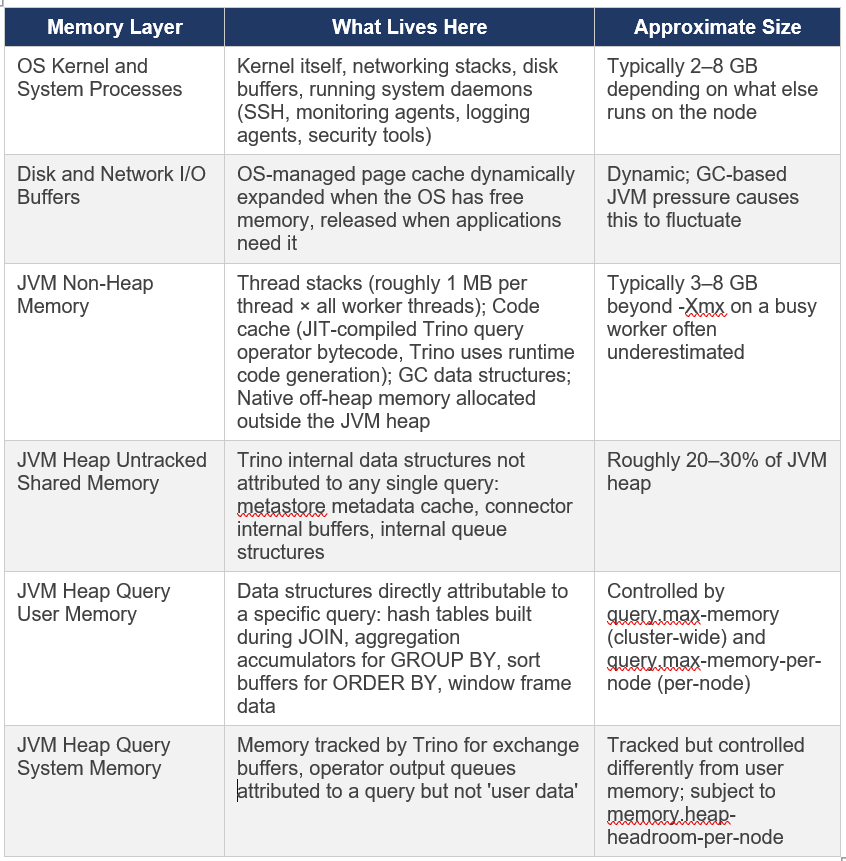
6.2 The Memory Allocation Formula
The official Starburst documentation states: ‘Typically, values representing 70 to 85 percent of the total available memory is recommended’ for the JVM heap. For larger nodes, the percentage can be lower because absolute headroom grows. Here is how I think about allocation on a 256 GB worker:
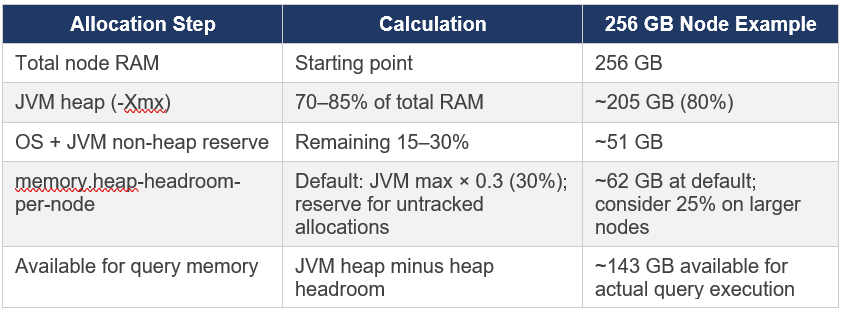
Memory arithmetic check: The official Starburst documentation states that the sum of query.max-memory-per-node and memory.heap-headroom-per-node MUST be less than the JVM heap size (-Xmx). If these two values sum to more than -Xmx, SEP will fail to start. This is validated at startup.
6.3 Correct Configuration Properties (SEP 453-e and Later)
This is where I want to be very precise, because several property names have changed across SEP versions and incorrect properties cause the cluster to fail to start. The following are correct for SEP 453-e LTS and all later versions including the current 477-e LTS.
config.properties on All Nodes
# === MEMORY MANAGEMENT ===

# Maximum distributed (cluster-wide) USER memory a single query can use
# User memory = data directly attributable to query execution (hash tables, sort buffers)
# Default: 20GB — almost always needs tuning upward for production workloads
query.max-memory=500GB

# Maximum user memory a single query can use on a single worker node
# The sum of (query.max-memory-per-node + memory.heap-headroom-per-node)
# MUST be less than the JVM heap (-Xmx). SEP validates this at startup.
query.max-memory-per-node=150GB

# Memory reserved as headroom for untracked JVM allocations
# Default: JVM max memory * 0.3
# Increase if workers are experiencing unexpected OOM errors despite query memory limits looking fine
memory.heap-headroom-per-node=50GB
6.4 Understanding query.max-memory — The Cluster-Wide Cap
This is one of the most commonly misunderstood settings in Starburst/Trino deployments. query.max-memory is NOT a per-node limit. It is the total memory a single query is allowed to consume across all worker nodes combined.
Example: If you have 25 workers and set query.max-memory=500GB, a single query can use up to 500GB distributed across all 25 machines — approximately 20GB per worker on average. In practice, distribution is uneven (JOIN build sides concentrate memory on specific nodes), which is why per-node limits also matter.
How to set query.max-memory:
Start with a value that covers your largest realistic single-query memory consumption (measure with EXPLAIN ANALYZE on your heaviest queries)
Set it high enough that legitimate large queries succeed, but low enough that a runaway query cannot consume the entire cluster
Use resource groups to apply different query.max-memory limits for different user groups — interactive users get lower limits than ETL jobs
6.5 Memory and Data Skew
Even with correct memory configuration, data skew can cause EXCEEDED_LOCAL_MEMORY_LIMIT errors on individual workers while the cluster-wide memory usage looks fine. This happens because the per-node limit (query.max-memory-per-node) is enforced independently on each worker, and a skewed key causes one worker to accumulate disproportionately large hash table data.
Example from production: A JOIN on user_id where user_id=0 represents 30% of all rows. Worker assigned hash(0) % 25 must build a hash table 7.5x larger than the average worker (30% vs 4%). If query.max-memory-per-node is set to the average expected usage, this worker will OOM while others have abundant headroom.
Remediation options:
Pre-filter known skewed values before the JOIN, If user_id=0 (anonymous) is not analytically relevant, filter it out with WHERE user_id != 0
Increase query.max-memory-per-node to handle the skewed case , but this reduces concurrent query capacity
Restructure the query to avoid the skewed join key being the shuffle key
For GROUP BY skew: GROUP BY with skewed keys benefits from partial pre-aggregation on workers (Trino does this automatically) before the final shuffle
Chapter 7: JVM Configuration — The Current Official Template
Trino is a Java application and JVM configuration directly affects query throughput, GC pause times, and stability. The JVM configuration has evolved significantly as SEP has moved through Java versions. What follows is the current official template from the Starburst Kubernetes configuration documentation, validated against SEP 477-e LTS.
7.1 Java Version Requirements by SEP Version
This is operationally critical. SEP has strict Java version requirements that change with each LTS release, and using the wrong Java version causes SEP to refuse to start.JDK is now bundled: Since SEP 462-e, SEP ships with the correct JDK version bundled. You do not need to separately install Java on nodes. The bundled JDK is Eclipse Temurin OpenJDK from Adoptium. If you set JAVA_HOME to override the bundled JDK, ensure it matches the minimum required version for your SEP release, using an older JDK causes startup failure.
7.2 The Official jvm.config Template (SEP 477-e LTS)
This is taken directly from the official Starburst Kubernetes configuration examples at docs.starburst.io/latest/k8s/sep-config-examples.html. For bare-metal or VM deployments, the same flags apply in etc/jvm.config, with -Xmx set explicitly instead of using RAM percentage flags:
server
-Xmx205G                           # Set to 70-85% of total node RAM
-XX:InitialRAMPercentage=80        # K8s-friendly alternative to explicit Xmx & use InitialRAMPercentage/MaxRAMPercentage instead
-XX:MaxRAMPercentage=80            # K8s-friendly alternative to explicit Xmx
-XX:G1HeapRegionSize=32M           # G1GC region size — 32M recommended for large heaps
-XX:+ExplicitGCInvokesConcurrent   # Prevents stop-the-world GC when System.gc() is called
-XX:+ExitOnOutOfMemoryError        # CRITICAL: exit cleanly on OOM; let process manager restart
-XX:+HeapDumpOnOutOfMemoryError    # Write heap dump for post-mortem analysis
-XX:-OmitStackTraceInFastThrow     # Preserve stack traces even for frequently thrown exceptions
-XX:ReservedCodeCacheSize=512M     # Code cache for JIT-compiled query operators
-XX:PerMethodRecompilationCutoff=10000
-XX:PerBytecodeRecompilationCutoff=10000
-Djdk.attach.allowAttachSelf=true
-Djdk.nio.maxCachedBufferSize=2000000
-Dfile.encoding=UTF-8
-XX:+EnableDynamicAgentLoading    # Required for JOL (Java Object Layout) agent support
Note on -Xms: The official Starburst jvm.config template does NOT include -Xms (initial heap size). Setting -Xms equal to -Xmx (the pattern sometimes recommended to avoid heap resizing) is not in the current official template. The -XX:InitialRAMPercentage flag achieves a similar goal in containerised deployments. On bare metal, -Xmx alone is the current official guidance.
7.3 Key JVM Principles Explained
Why -XX:+ExitOnOutOfMemoryError Is Critical
When a JVM hits an OutOfMemoryError, the JVM is in an inconsistent state. Objects may be partially initialised, locks may be held, and the garbage collector may be unable to recover. Attempting to continue running after an OOM typically leads to cascading failures, corrupted state, and queries that appear to hang rather than fail cleanly.
With -XX:+ExitOnOutOfMemoryError, the JVM exits immediately when OOM occurs. The process manager (systemd on VMs, Kubernetes on containers) restarts the Trino process in a clean state. Other workers that were not affected continue serving queries. The coordinator detects the worker departure and marks any in-flight queries on that worker as failed, allowing clients to retry.
Why OS Swap Must Be Disabled
Trino’s JVM uses G1GC (Garbage First Garbage Collector), a compacting garbage collector. G1GC works by moving objects between memory regions and continuously compacting the heap to eliminate fragmentation. Because objects move frequently, there are no stable ‘cold’ memory regions that the OS could safely page to swap disk.
If the OS swaps any part of the JVM heap, G1GC may need to touch that swapped page during a collection cycle, triggering a page fault and dramatically extending GC pause times. A GC pause that should take 200ms can extend to many seconds when swap is involved, manifesting as erratic query latency spikes.
The official Starburst documentation explicitly states: ‘Allocation of all memory to the JVM or using swap space is not supported, and disabling swap space on the operating system level is recommended.’
The Code Cache — An Often Overlooked Limit
Trino uses runtime code generation for query operators & it generates optimised Java bytecode at query execution time based on the specific types and operations in each query. This generated code is stored in the JVM code cache.
If the code cache fills up (-XX:ReservedCodeCacheSize), the JVM stops compiling new code and falls back to interpreted execution. This causes a progressive and difficult-to-diagnose performance degradation & queries get slower over time as the cache fills, but there may be no obvious error. The 512MB setting in the official template is appropriate for production SEP workloads.
7.4 Kubernetes-Specific JVM Considerations
When running SEP on Kubernetes, several JVM behaviours require specific attention:
CPU limits vs. requests: Do NOT set CPU limits on SEP coordinator or worker pods. The official Starburst Kubernetes documentation documents this explicitly hard CPU limits cause JVM CPU throttling even when the node has headroom, degrading performance. Set CPU requests only.
Container memory limits: Set memory limits equal to memory requests to prevent OOM eviction. The JVM heap (-Xmx or MaxRAMPercentage) plus non-heap overhead must fit within the container memory limit.
JVM cgroup awareness: Modern JDK versions (17+) are cgroup-aware InitialRAMPercentage and MaxRAMPercentage calculate percentages of the container’s memory limit, not the node’s total RAM. This makes K8s deployments cleaner than specifying absolute -Xmx values.
# Recommended K8s resource configuration (values.yaml)
coordinator:
  resources:
    requests:
      memory: '256Gi'
      cpu: 32
    limits:
      memory: '256Gi'
      # NO cpu limit — critical for JVM performance
worker:
  resources:
    requests:
      memory: '256Gi'
      cpu: 32
    limits:
      memory: '256Gi'
      # NO cpu limit — critical for JVM performance
Chapter 8: Disk Spilling Why I Recommend Against It
Spilling is Trino’s mechanism for reducing memory consumption during JOIN and aggregation operations by writing intermediate data to local disk and reading it back in batches. It is a legitimate feature that can save queries that would otherwise fail with OOM errors. My recommendation after years of production experience: design your cluster so you never need it.
8.1 How Spilling Works
When a query exceeds its memory limit during execution:
JOIN spill: The build-side hash table (and matched probe rows) are serialised to disk in sorted partitions. Each partition is later read back from disk and the join continues partition by partition. The join completes, but requires multiple passes of disk I/O.
Aggregation spill: Partial aggregation accumulators are written to disk in sorted order and then merged in a second pass similar to an external sort.
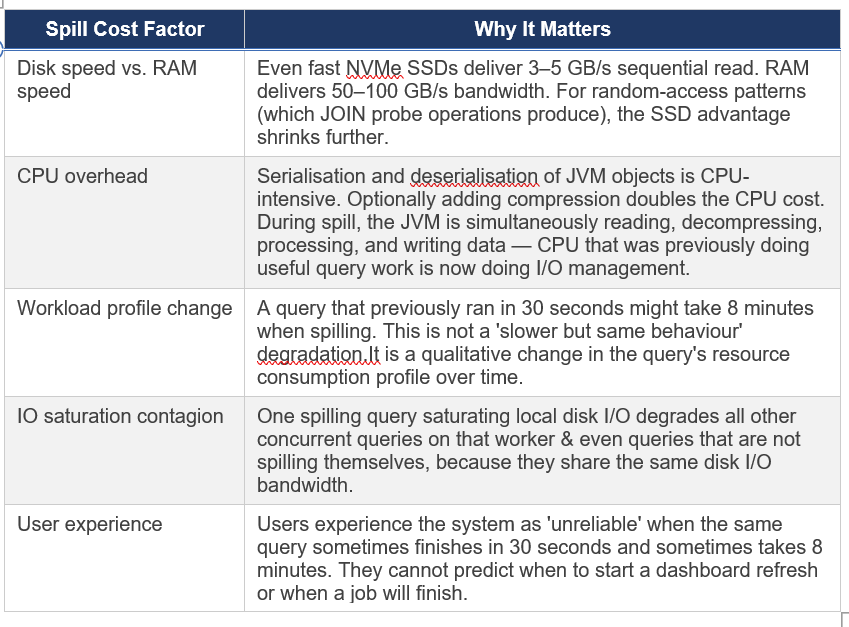
8.2 The Real Cost of Spilling
The mechanics sound manageable. The production reality is less friendly:
8.3 Configuration
Spilling is disabled by default in Trino/SEP. If you are on an older version where it was previously enabled or are considering enabling it, the current configuration properties are:
# Default: false — spilling disabled
# Only enable if you have a specific, accepted use case
spill-enabled=false

# If enabling spill, configure the spill path to a fast local disk
# Do not use object storage or network filesystems for spill
spiller-spill-path=/var/trino/spill
max-spill-per-node=500GB
query-max-spill-per-node=100GB
What to do instead of spilling:
Add memory to worker nodes , the right long-term fix.
Rewrite the query to use approximate functions (approx_distinct, approx_percentile) dramatically lower memory requirements.
Pre-aggregate or pre-sort the data to reduce JOIN memory requirements.
Use resource groups to prevent multiple memory-heavy queries from running concurrently.
Use bucketing to enable node-local joins that eliminate the distributed hash table pattern. All of these are better than relying on spill.
Chapter 9: Task Concurrency and Worker Scheduling
After memory and JVM, the next configuration layer is how Trino schedules work within and across workers. Trino uses a cooperative, fair-share task scheduler all queries share the same thread pool on each worker, with preemption to prevent long queries from starving short ones.
9.1 Core Scheduling Properties
These go in config.properties on all nodes. Verify property names against docs.starburst.io/latest/admin/properties.html for your specific SEP version, as property names occasionally change across major releases:
# === TASK AND SCHEDULING ===

# Number of concurrent processing threads per task on each worker
# Rule of thumb: set to 2x physical core count (NOT vCPU count on hyperthreaded instances)
# Example: m7i.16xlarge has 32 physical cores → task.concurrency=64 (or match vCPU count)
# Example: Graviton ARM has no hyperthreading → task.concurrency = vCPU count
task.concurrency=32

# Threads handling HTTP data exchange between workers (shuffle network traffic)
# Increase for high-concurrency clusters with many simultaneous queries
task.http-response-threads=100

# Timeout for HTTP data exchange between workers
# Increase if network latency between nodes is high or cluster spans availability zones
task.http-timeout=2m
Setting task.concurrency correctly matters: If set too low, CPUs sit idle even when work is available. If set too high, too many threads compete for the same CPU cores, increasing context switching overhead. The recommended starting value is 2x physical cores. On ARM instances without hyperthreading (Graviton, Ampere), use the vCPU count directly.
9.2 Split Assignment Configuration
# Maximum number of splits queued per worker node
# Increase for workloads with many small splits (many small files)
node-scheduler.max-splits-per-node=100

# Maximum pending (not yet started) splits per active task on a worker
node-scheduler.max-pending-splits-per-task=10
9.3 Resource Groups — Sharing the Cluster
Resource groups are the mechanism for controlling how concurrent queries share cluster resources. They define limits on the number of running and queued queries per group, and they implement a psychology-based approach to fairness: the design goal is to maximise user happiness, not just mathematical resource utilisation.
From the original Presto Training Series (Dain Sundstrom, Starburst 2020): ‘Focus on maximizing user happiness — psychology not computer science. User experience should match expectations. Small, fast, trivial queries should run immediately. People hate waiting in line.’
SEP Resource Group Systems
SEP 477-e LTS offers two resource group implementations:
Built-in Resource Groups: The current and preferred approach. Configured via the Starburst Enterprise Web UI under the Workload Management section, or via the Starburst REST API. Enabled by setting resource-groups.configuration-manager=starburst in config.properties.
Legacy SEP Resource Groups: JSON-file-based configuration, compatible with the Trino open source resource group format. Still functional but superseded by built-in resource groups in current SEP.
If you are coming from older Starburst or Trino documentation that shows YAML or JSON resource group files, that approach still works in current SEP. The built-in resource groups via the Web UI are the newer, recommended path for new deployments. You can migrate from the file-based approach to built-in resource groups — see SEP DOCS for migration guidance.
Designing Effective Resource Groups
The principles I apply in practice:
Separate interactive from batch: Interactive queries (dashboards, ad-hoc exploration) have latency expectations measured in seconds. Batch ETL jobs have latency expectations measured in minutes. Give each group enough capacity that interactive queries are never blocked by batch jobs.
Allow every user at least one concurrent query: No one should hit a queue waiting to start even a single query during normal operation. Queuing should only occur when a user or team is genuinely overloading their allocation.
Group by organisational unit: Teams regulate each other better than administrators can regulate everyone. Let team leads see what their team is running and kill queries in their group.
Set conservative initial limits and expand: It is easier to relax a limit that is too tight than to tighten a limit that users have come to expect as available capacity.
Example Resource Group Structure
# config.properties — enable built‑in resource groups
resource-groups.configuration-manager=starburst

# Example hierarchy (configure via Web UI, REST API, or resource-groups.json)
# Semantics only, not a literal config file

Global (root group)
  softMemoryLimit: 80%      # Soft memory ceiling (queries can briefly exceed)
  hardConcurrencyLimit: 150 # Total concurrent running queries cluster‑wide
  maxQueued: 1000           # Max queued before rejecting new queries

  Interactive (subgroup)
    softMemoryLimit: 50%
    hardConcurrencyLimit: 75
    maxQueued: 300
    schedulingPolicy: fair     # Each user gets equal share

  Batch-ETL (subgroup)
    softMemoryLimit: 30%
    hardConcurrencyLimit: 20
    maxQueued: 500
    schedulingPolicy: weighted # Priority‑weighted execution

  System (subgroup for internal jobs)
    softMemoryLimit: 10%
    hardConcurrencyLimit: 10
    maxQueued: 100
9.4 Autoscaling on Kubernetes
When running SEP on Kubernetes (EKS, AKS, GKE), you can configure Kubernetes autoscaling to add worker pods under load and remove them when idle. This is particularly useful for:
Bursty analytical workloads where peak demand is 3–5x average demand & paying for peak capacity 24/7 is wasteful
Cost optimisation when workloads follow business-hours patterns
Scaling for large one-off jobs without permanently increasing cluster size
SEP integrates with the Kubernetes Horizontal Pod Autoscaler (HPA) via KEDA (Kubernetes Event-Driven Autoscaling), which allows scaling based on Trino-specific metrics like queue depth or running query count. Configure KEDA integration through the SEP Helm chart values.yaml. We’ll explore this concept in more detail in Part 4 of this series.
Autoscaling caveat: New worker nodes take time to register with the coordinator and warm up (JIT compilation of hot code paths). For latency-sensitive interactive workloads, always maintain a baseline number of warm workers and scale around that baseline. Scaling from zero is appropriate only for batch workloads where startup latency is acceptable.
Chapter 10: Hive Caching — What It Does and What It Does Not Do
Starburst Enterprise provides several caching layers for Hive connector operations. Caching can help with specific bottlenecks, but each layer has trade-offs that matter in production.
10.1 Metastore Metadata Caching
The Hive Metastore Service (HMS) is a relational database that Trino queries at the start of every query to resolve table schemas and list partitions. A slow HMS causes queries to sit in the planning phase with CPUs idle.
# Cache HMS table and partition metadata in Trino’s memory
hive.metastore-cache-ttl=10m
hive.metastore-refresh-interval=5m
hive.metastore-cache-maximum-size=10000
Trade-off: cached metadata means new partitions or schema changes may not be visible until the cache expires. For rapidly-changing tables, reduce the TTL or disable caching. For stable tables, a longer TTL improves query planning performance significantly.
10.2 File Listing Cache
Before reading data from HDFS or object storage, Trino must list files in the relevant partition directories. With millions of small files in S3, this can take seconds to minutes.
# Cache file listing results to avoid repeated S3/HDFS list operations
hive.file-status-cache-expire-time=5m
hive.file-status-cache-size=1000000
Trade-off: new files written to existing partitions will not be visible until the cache expires. In streaming or near-real-time workloads where fresh data matters, reduce the TTL or disable. For batch workloads with daily or hourly partitions, this cache provides significant speedups.
10.3 Native File System Data Cache
SEP’s native file system cache stores actual file data blocks on Presto worker local disks, enabling repeated access to the same data without hitting object storage each time.
# CURRENT property name
fs.cache.enabled=true
# Configure the cache storage path (fast local SSD recommended)
fs.cache.directories=/mnt/cache/trino
Reality check on the native data cache: It helps for repeated access to the same data by the same worker with a pattern that occurs in interactive dashboards where users repeatedly query the same date range. It does not significantly help for:
First-time access to data (cold cache always misses)
Queries that access different data ranges on each run (most ETL/batch patterns)
Object storage (S3, GCS, ADLS) performance — the cache helps, but network round-trip latency to S3 is already low, so the benefit is less pronounced than for HDFS
In the next part, Part 3: Query & Workload Tuning, we’ll dive into EXPLAIN ANALYZE, Cost-Based Optimization (CBO), and effective data organization strategies
Further Reading
The concepts covered in this part are grounded in official Starburst documentation and Trino fundamentals. The following references are recommended for deeper exploration and version-specific details.